App Mixer
StablePer-app volume, audio routing and Focus Ducking for Windows 11.
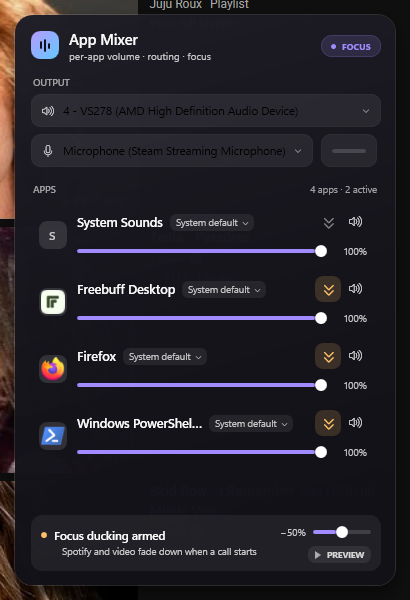
App Mixer puts every app on its own volume slider without making you dig through Windows' sound settings. It lives in the tray: one click opens a flyout with what is playing, each app's level, and the device it is coming out of.
Focus Ducking turns everything else down while your call, recording or video keeps its level — then puts it back. The system output and default microphone can be switched from the same flyout.
What it does
-
Per-app volume
A slider and mute for every app, in one flyout instead of the Windows mixer.
-
Audio routing
Send an app's sound — or its microphone — to a different device.
-
Focus Ducking
Lower every other app for a meeting or a recording, then restore it in one click.
-
Device switching
Change the system output and the default microphone without leaving the flyout.
Release notes
- 1.0.0 — first public release. Per-app volume, routing, Focus Ducking and the tray flyout.